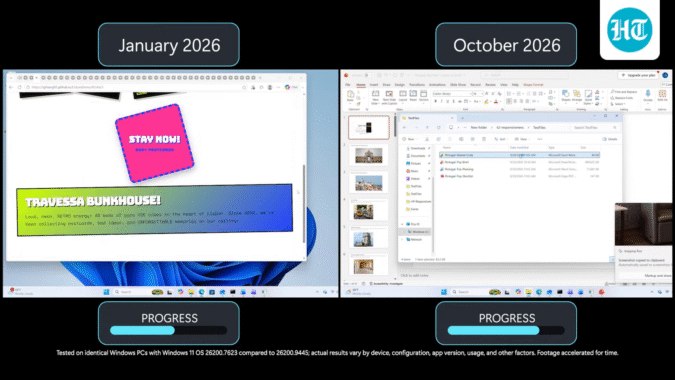
With memory for PCs currently either in short supply or very expensive, Microsoft hopes foundational improvements to Windows 11 operating system (OS) will help it run better on millions of PCs with 8 GB memory. The company is targeting that spec baseline with a set of updates for Windows PCs. It said its internal tests showed Windows is up to 20% more responsive and multitasking up to 40% faster than before on machines with 8GB of RAM.
In an official post, Windows + Devices executive vice president Pavan Davuluri called the latest update an important step in the journey and added that memory optimisation and further tweaks are on the agenda.
“More efficient memory use means more room for what you’re doing, whether that’s running a small business, collaborating at work, teaching or learning, or using your PC at home,” Davuluri said.
Microsoft said it is tweaking Windows 11’s architecture in three ways – smarter use of memory, particularly on 8GB PCs, by reclaiming memory and reprioritising apps as the user accesses them; reconfiguring of certain interactions such as clicking on Start, searching, right-clicking the menu and opening file explorer for better responsiveness; and making improvements across Windows, Microsoft Edge and the Microsoft 365 app to use less memory.
The updates discussed by Davuluri in a social media post earlier today mark a sequential progression of memory optimisations that were first released in July and subsequently in the months after as part of regular Windows updates. These changes will be visible in Windows 11, version 26H2, build 26300.9818 or later versions on PCs.
These developments are relevant for current generation and upcoming desktops and laptops as well, apart from existing PCs, since 8GB memory is once again becoming a more common spec (16GB memory did catch on with many mid-range and premium laptops, but that’s no longer the case due to cost of components).
The testing methodology
Microsoft’s claim that Windows is 20% more responsive on PCs with 8GB memory comes from what they said are telemetry measurements of response times for Search, Start, right-click, Settings, Snipping Tool and File Explorer on PCs with 8GB memory, comparing a new Windows 11 OS build 26300.9550 with an earlier OS build 26200.7628.
As for Microsoft claiming that multitasking is up to 40% faster than before, the tests were done on an HP OmniBook 3 with 8 GB of memory and Snapdragon X Plus 8-Core processor, to compare Windows 11 OS build 26200.7623 with OS build 26200.9445. While Microsoft does not share exact telemetry data, the company said the completion time was measured with automated UI validation confirming each step before the next began.
More work to be done
“Memory compression already helps Windows keep more of your work in faster memory. Next, we’re making it even smarter and more efficient to get the most out of your system performance,” Davuluri said, charting the agenda for the next set of Windows updates.
He said the Windows features and apps will share common parts instead of each carrying its own. For instance, Search and Widgets will share one web engine, so will OneDrive and Photos for memory savings across all four apps.
Apps and experiences built on WinUI 3 (this is Microsoft’s native user interface framework for building modern Windows desktop applications), including File Explorer, Notepad, Paint, and the new Windows search are being designed to open faster and use less memory.
Microsoft said it is also working with PC makers and chip makers to rework how much memory a PC needs for its hardware, and therefore, open up more for Windows 11 and the apps people use. They are also working with app developers to ensure the apps they release take advantage of Windows 11’s new optimisations.