A few days ago, I found some relevant numbers that will help set context. CyberMedia Research (CMR)’s India Tablet PC Market Review for Q4 2025 notes the tablet market grew 41% year-on-year in the quarter, and that premium large-screen tablets (they specifically note 11-inch displays or larger) accounted for 85% of shipments. There are reasons for that, as I have often noted in analysis of tablets launched through the past year — tech companies such as Xiaomi are doing more for the cause of Android tablets, than Google themselves. Xiaomi’s previous three generations of the ‘Pad’ series have each moved the needle significantly, particularly the Xiaomi Pad 7 that also introduced a nano-texture display. The Xiaomi Pad 8 is walking the same path.
While the Xiaomi Pad 8 starts at ₹33,999, offering 8GB + 128GB and 12GB + 256GB variants, several highlights deserve focus. First, Xiaomi is bundling the Focus Pen Pro, with its buttonless design and precision hover capabilities as an option from the outset. Secondly, the Nano Texture Display variant is available from the outset for just a ₹2,000 increment over the standard version — and this will have its own advantages, which I’ll explain. Third, and perhaps somewhat perplexing, is Xiaomi not having a 5G option, physical SIM or eSIM, with the Pad 8. This isn’t an India specific policy, the global Pad 8 positioning is without cellular connectivity (as it was with the Pad 7). This may be a miss, for a certain demographic.
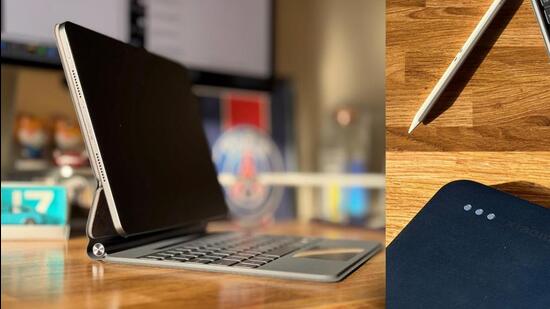
The Workstation Mode continues to be a personal favourite, even though it took a bit of time to get the touchpad tracking speed just right on the Xiaomi Pad 8 Focus Keyboard (that’s ₹8,999; there’s also a Pad 8 Keyboard for ₹4,999). This accessory is crucial if you are looking at this tablet as a secondary work machine or that versatile travelling companion. Back to the Workstation Mode — it unlocks an interface similar to your Windows laptop or desktop, which means windowed apps and more versatile screen space sharing. It is ideal to have emails open on one side as you work on documents alongside. To expect any platform now not to have a substantial artificial intelligence (AI) suite would be fallacious. The Xiaomi HyperAI collective of AI voice transcription, an AI calculator and Google Gemini provide just the necessary utility.
It was last year when Xiaomi truly democratised the nano-texture display tech in Android tablets, and no rival has managed to replicate this in the meanwhile. What is the big deal with this nano-texture coating? This is essentially an extra layer of treatment on a display, a tablet in this case, to create a matte-like surface. This is designed in a way that any light, direct or otherwise that may be hitting this display if it were glossy and smooth, gets scattered. That is the method to negate reflections, which are otherwise all too common on most tablet, laptop, smartphone and desktop PC displays — the glass layer is conducive to reflections. With less light escaping, blacks tend to look deeper, and that’s a positive for colours across the spectrum.
Since the primary benefit is reflection elimination, and Xiaomi’s implementation remains astonishingly good, the tablet immediately becomes much more comfortable to use in most indoor and outdoor lighting conditions. This is particularly true for brightly lit environments. Many an office floor tends to be littered with hard, cool-temperature bright ceiling lights that generate reflections off any standard display. I’d say anyone and everyone except those doing video and photo editing workflows (for the want of nothing impeding judgement of colours, textures and shades) will appreciate the nano-texture methodology.
The thing is, you have to be very careful if the Xiaomi Pad 8 with the 11.2-inch Nano Texture display is what you’re buying. First, dust and fingerprints show up rather easily and it must only be cleaned with a soft cloth (and that’s not just a display observation, the Titanium Blue back also struggles). Secondly, if you intend to share your tablet with a child as well from time to time, the nano-texture may not hold up as well to even the slightest of rough usage. The 3:2 aspect ratio is perfect for most apps, but if you’re multitasking, an even wider aspect ratio wouldn’t exactly have felt out of place.
Last year’s Xiaomi Pad 7 used one of the better mid-range processors at the time, and its a similar template for the Xiaomi Pad 8 with the Qualcomm Snapdragon 8s Gen 4 chip. My recommendation would be the 12GB memory variant, purely for the future proofing aspect. This is a very responsive machine, and handles multitasking scenarios with absolute ease. This handles the typical scenario of 24 Chrome tabs, a video meeting on Zoom, two documents open on WPS Office and the Canva app for edits, without any signs of strain. There are opinions about HyperOS 3 in general, but I’m a fan of how it has evolved particularly for tablets. This machine ideally shouldn’t slow down, unless you end up brimming the storage.
It’s a large 9,200mAh battery which can now return more than 20 hours of continuous on-screen time across a mix of typical workplace apps. With 45-watt charging, getting this ready for a couple more days at work takes less time than before.
There are some continuity themes that are more restrained, perhaps too risk averse. The Xiaomi Pad 8 is a step forward in the broader Android tablet formula collective, both as a tablet for typical casual usage, and as a work machine. The additional step with the nano-texture should be quite attractive as an experience for many who may be considering the Pad 8, with everything else falling just perfectly around it. There is a nagging sentiment that the lack of any cellular connectivity options may be a miss for travellers in particular. That said, it is good to see Xiaomi make tablet after tablet with genuine usability improvements, rather than just focusing on the spec sheet.