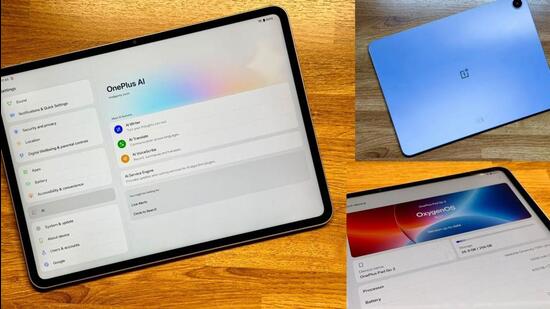
Within OnePlus’ tablet hierarchy, the ‘Go’ moniker tablet sits a notch above the entry-spec ‘Lite’ portfolio. Think of this as the middle child in that family, and one that in its latest iteration, is significantly matured. The OnePlus Pad Go 2, irrespective of the name being a bit long-winded, is a certain step forward over its predecessor, the OnePlus Pad Go in terms of the baseline specs, and therefore the experience. A powerful MediaTek Dimensity 7300-Ultra replaces the MediaTek Helio G99, and whilst it’s still 8GB memory, it’s a faster module. And so is the storage, which is now the UFS 3.1 standard instead of UFS 2.2 in the previous OnePlus Pad Go. More than anything else, this allows the OnePlus Pad Go 2 to not only keep up with the times, but as OnePlus has consistently done over the past few years, renews a case for Android tablets as multipurpose machines.
Improvements in specs don’t end there, and that more than justifies the slight pricing increment which sees the OnePlus Pad Go 2 start at ₹23,999 compared with ₹18,999 onwards for the OnePlus Pad Go. The display real estate is larger now, 12.1-inches which seems to be becoming the norm range for Android tablets now, compared with 11.35-inches earlier. It is a crisper, brighter and more vivid screen. Colours look really good, which provides the fillip for content consumption. Readability on this screen is quite good too, because the resolution allows for just the right pixel density (that’s number of pixels per inch, or ppi) to deliver crisp web pages and ebooks. This also supports the stylus, in case you’d like to add that to the proposition for artwork or productivity boosts such as handwritten notes.
Open Canvas has been a permanent fixture in OnePlus tablets for a long time now, and refinements continue. In the OnePlus Pad Go 2, having two apps side by side in split screen mode makes full use of the space that’s available. There are multi-touch gestures you can try and remember, including swipe down with two fingers to activate split-screen mode, or pinch inwards with four fingers to convert any full-screen app into a movable floating window — but I prefer the three button menu atop each app window in task manager, to achieve the same Open Canvas result.
The choice of the MediaTek Dimensity 7300-Ultra chip makes perfect sense for the positioning of the OnePlus Pad Go 2, which finds itself in sort of the same price and utility as many phones that are powered by the same processor — Lava’s Play Ultra, Xiaomi’s Redmi Note 14 Pro and the Infinix Note 50X all run iterations of this same silicon. One could have perhaps expected a bump from 8GB memory, but even though that hasn’t happened, there is still enough in terms of the hardware boost and software refinement with OxygenOS 16 to collectively deliver a marked improvement in smoothness all round. At no point in our experience did the OnePlus Pad Go 2 struggle with multitasking, as a work focused second screen, or for media consumption.
The large 10,050mAh battery is a significant capacity boost generationally, up from 8,000mAh in the predecessor. This has a maximum wired charging speed of 33-watt, and can deliver close to 18 hours of video playback, in my experience — that should give you a fair idea of the stamina, and how that’ll translate for the apps that you’d regularly use. The OnePlus Pad Go 2 is very much a tablet that you can fully charge and carry for a short trip, without having to charge again in that time.
The OnePlus Pad Go 2 variant that we are analysing here doesn’t have a SIM slot (this is the Wi-Fi + mobile network from nearby devices variant), but that is an option too if you’d prefer the tablet to have dedicated 5G connectivity. For OnePlus phone users, it continues to be a simple task to set up to share your phone’s mobile data connection seamlessly with the tablet as well — one of the requirements is for both the phone and the tablet to be signed in with the same OnePlus account. Simply placing your phone and tablet in close proximity allows for connection sharing.
It is worth noting that OxygenOS 16 is an impressive operating system, with significant refinements for performance and stability under the hood, alongside visual improvements that not only befit a refined experience but also make better use of the tablet’s display real estate. A lot of focus, understandably so, is on the artificial intelligence (AI) layer called OnePlus AI. Useful points all around, beginning with the AI edit tools in the Photos app (AI Eraser, Unblur and Reflection Eraser are particularly handy with many photos). AI Translate and AI Summaries prove their worth from time to time, the latter more so in my line of work, with long PDFs a regular fixture. I’m still to regularly deploy AI Speaker, which reads on-screen content such as articles and documents, but you could have a use-case for it. There is of course Gemini deeply integrated, including Circle to Search.
The price tag and everything that makes up the intersecting hardware and experience arcs, leaves little to complain about. The OnePlus Pad Go 2 takes forward a legacy that I have often pointed out, of doing more for the cause of Android tablets, than Google itself has done in the past few years. This ticks the checklist beginning with a refined design (the Lavender Drift is particularly rare), and builds importantly with consistent performance that doesn’t throw up any stumbles or sluggishness, as well as a very refined software experience. Expect its competition to dial up in early 2026, but for now, at this price, there really isn’t a better, newer option for your shortlist.